
New name, same app · formerly Last Journal

Write the day down in seconds.

Tamsi is a quick, private journal for Android. A thought, a to-do, a feeling or a photo, saved before the moment is gone. Then back to your day.

Free to use · No account needed · Android 8.1 and up

No ads

Not now, not later. No ad trackers either.

No account needed

Your journal lives on your phone and works offline.

No AI reads your entries

Nothing you write is fed to an AI.

Encrypted backups

Encrypted on your phone before they're uploaded.

How it works

Small enough to use every day.

Open, write a line, close. Tamsi keeps the friction out so the habit can stay.

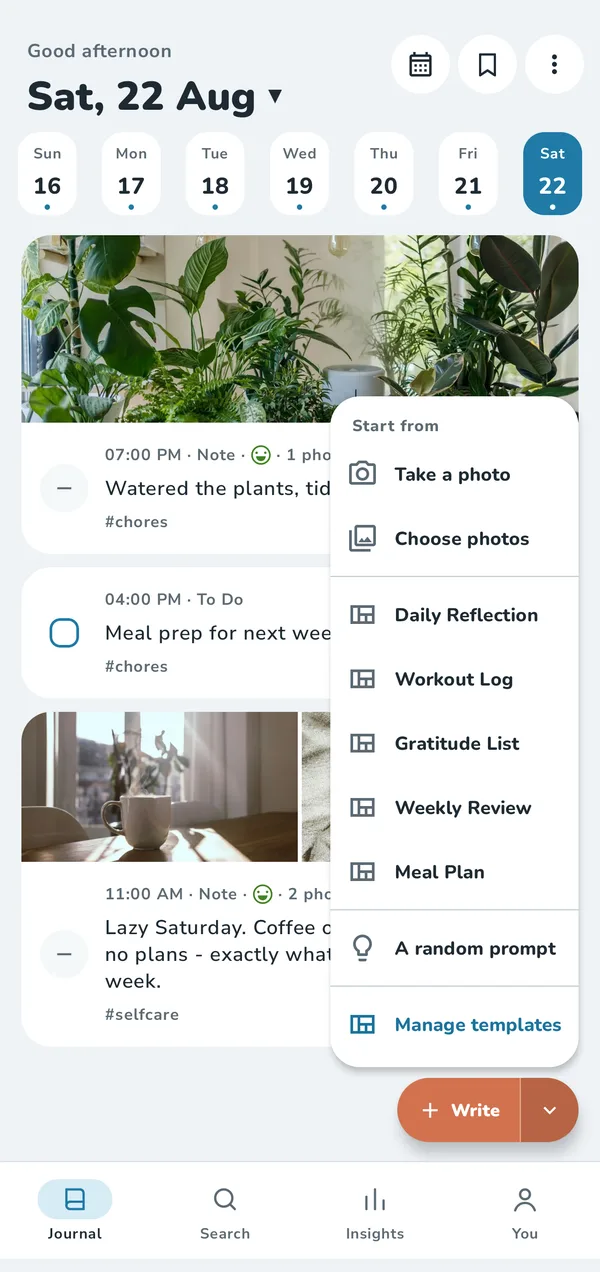
The Journal screen with the Write menu open: take a photo, choose photos, past memory, letter to future me, templates and a random prompt

Writing

One tap to write.

Tap Write and a fresh page is ready with the keyboard open. Or start from a photo, a past memory, a template or a prompt.

  • Past memory: start from an old photo and the entry lands on the day it was taken
  • Templates for the things you log often
  • A Write widget and a Quick Settings tile
  • A daily reminder at the time you choose
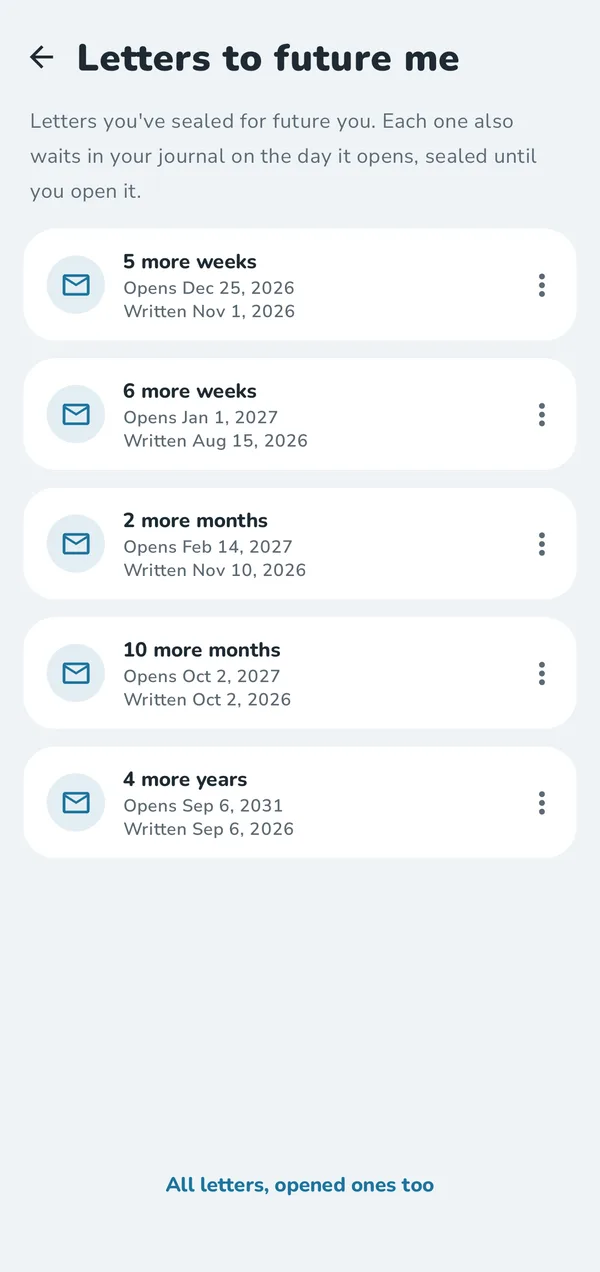
Letters to future me: five sealed letters, opening in 5 weeks, 6 weeks, 2 months, 10 months and 4 years

Letters to future me

Write to future you.

Seal a letter and choose the day it opens: next month, next year or years from now. Until then it stays sealed.

  • It waits in your journal on the day it opens
  • A note that morning, if you want one
  • Every letter you've sealed, with a countdown to each one's opening
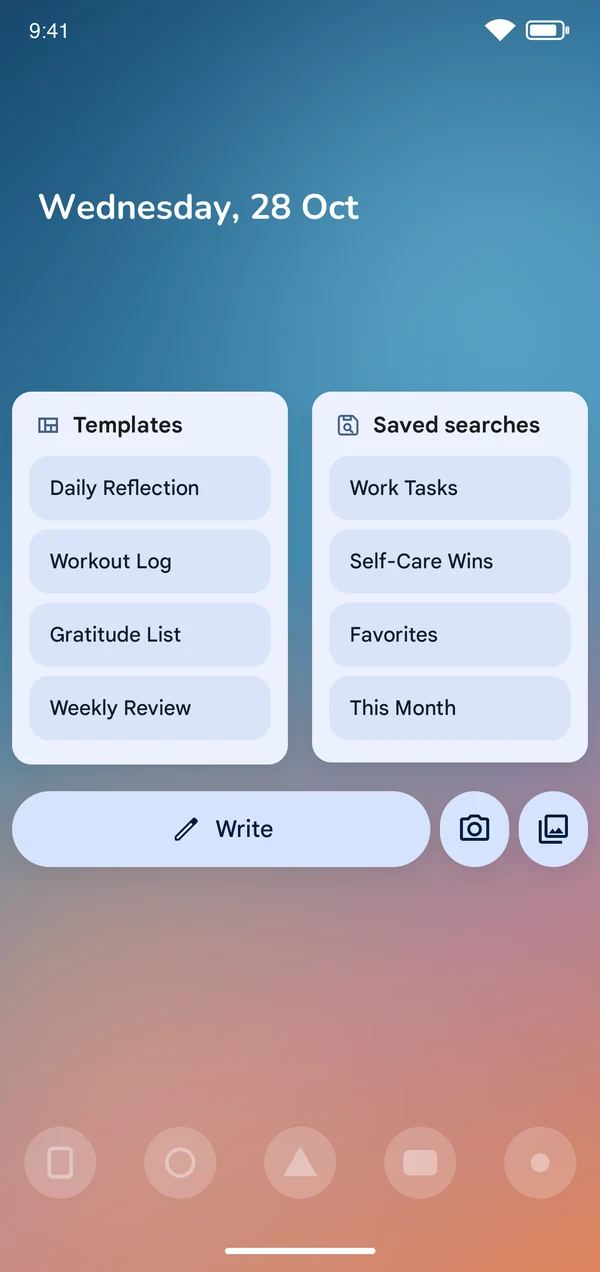
Three Tamsi home-screen widgets: Write with camera and gallery buttons, Templates and Saved searches

Widgets

Start from your home screen.

Write in one tap, open a template, or go straight to a saved search, without hunting for the app first.

  • Write, camera and gallery buttons in one widget
  • Your templates and saved searches, one tap away
  • Each widget has its own settings: how see-through it is, and the colour of its text and icons
  • Names stay hidden while app lock is on, unless you choose to show them
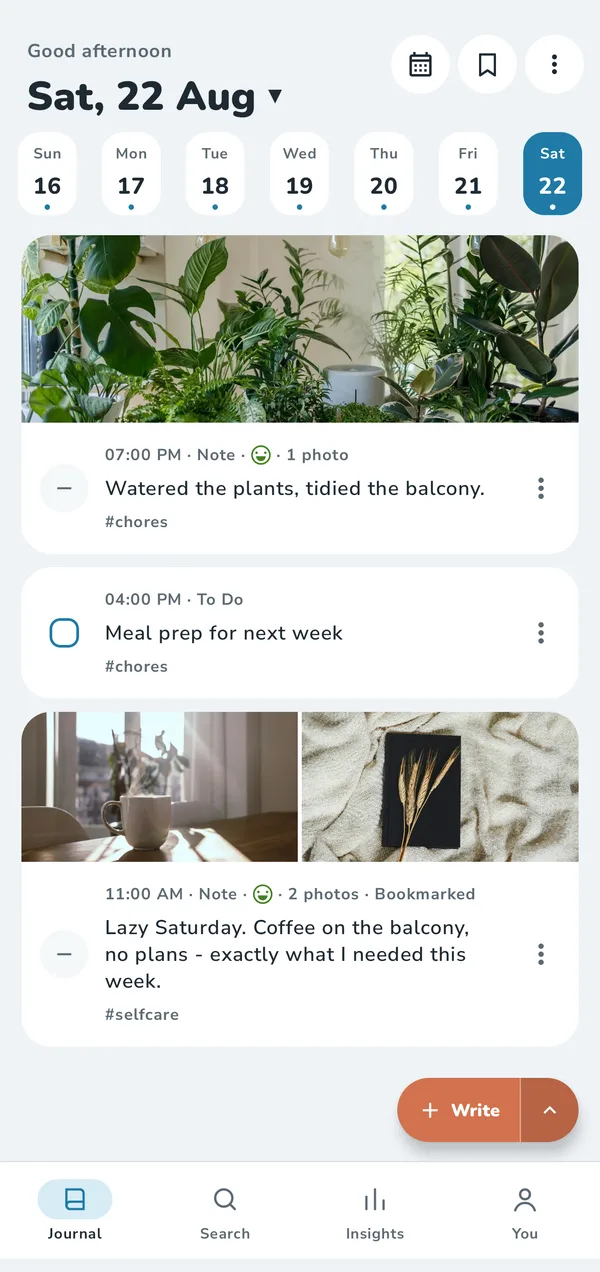
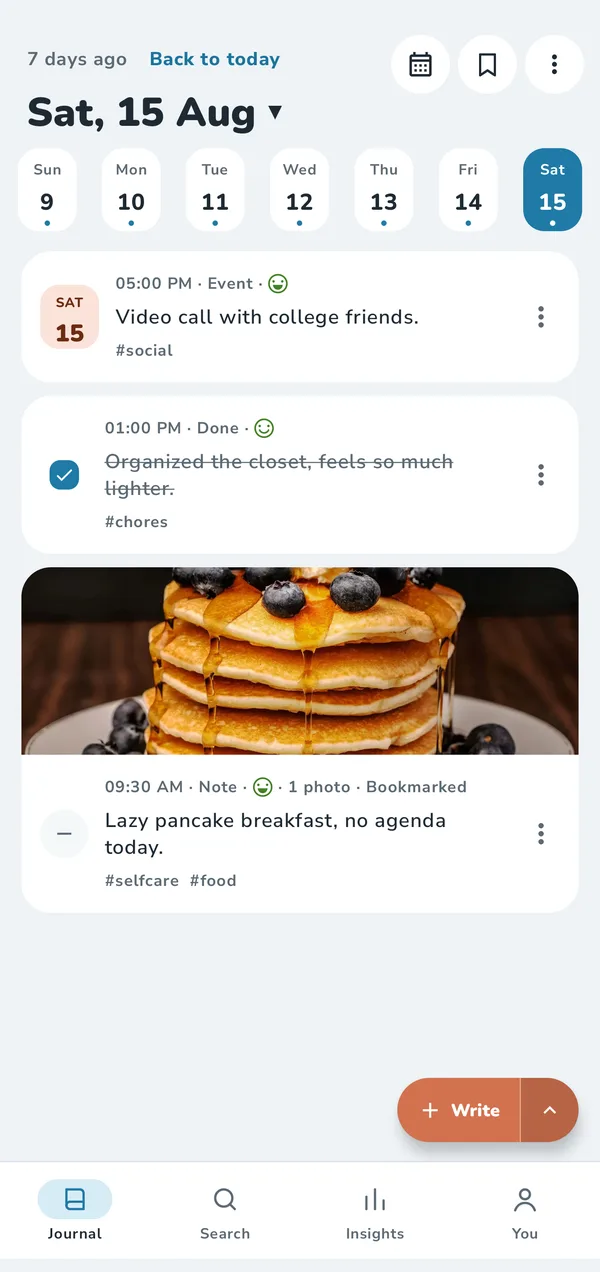
A week in the journal: an event, a finished to-do and a photo note

Your day, your way

Notes, to-dos, done and events.

Log the day the way it happened. Each entry can carry a mood and tags, and your week is one tap away.

  • To-dos you can tick off, with unfinished ones moved to today if you like
  • Search by words, #tags and moods, saved searches and Insights
  • On this day: what you wrote in past years
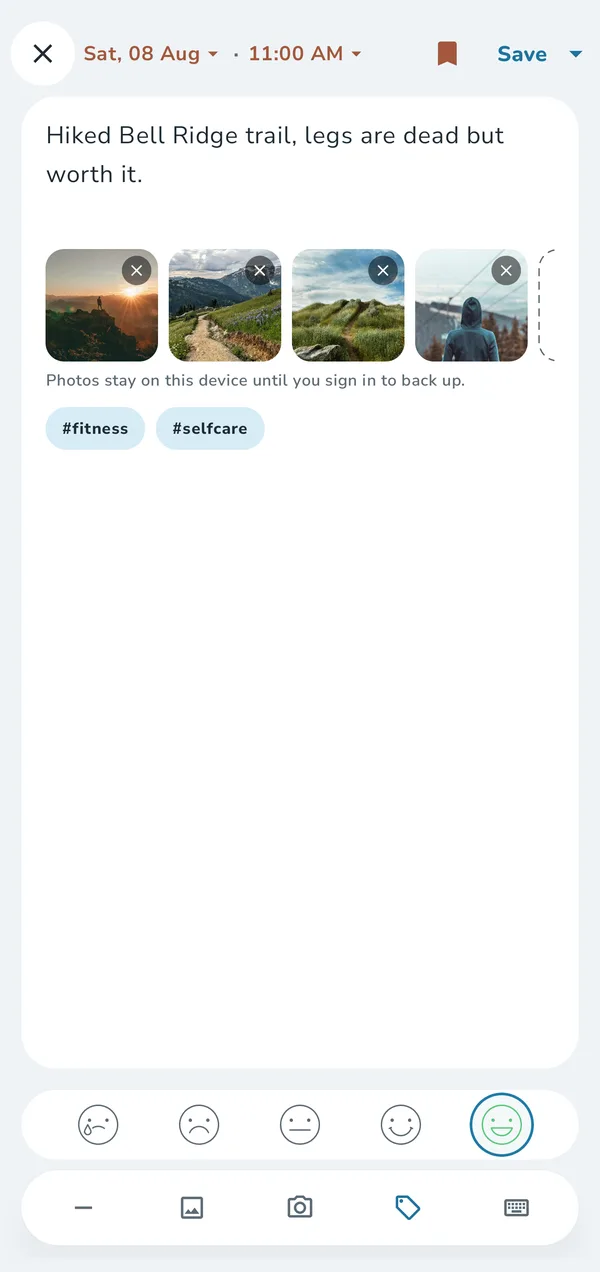
An entry about a hike with four photos, a mood and two tags

Photos

The photos that made the day.

Add up to 20 photos to any entry, or share them in from your gallery and other apps.

  • Location and camera details are removed from the copy Tamsi keeps
  • Your original photos stay untouched in your gallery
  • Share photos from an entry with any app
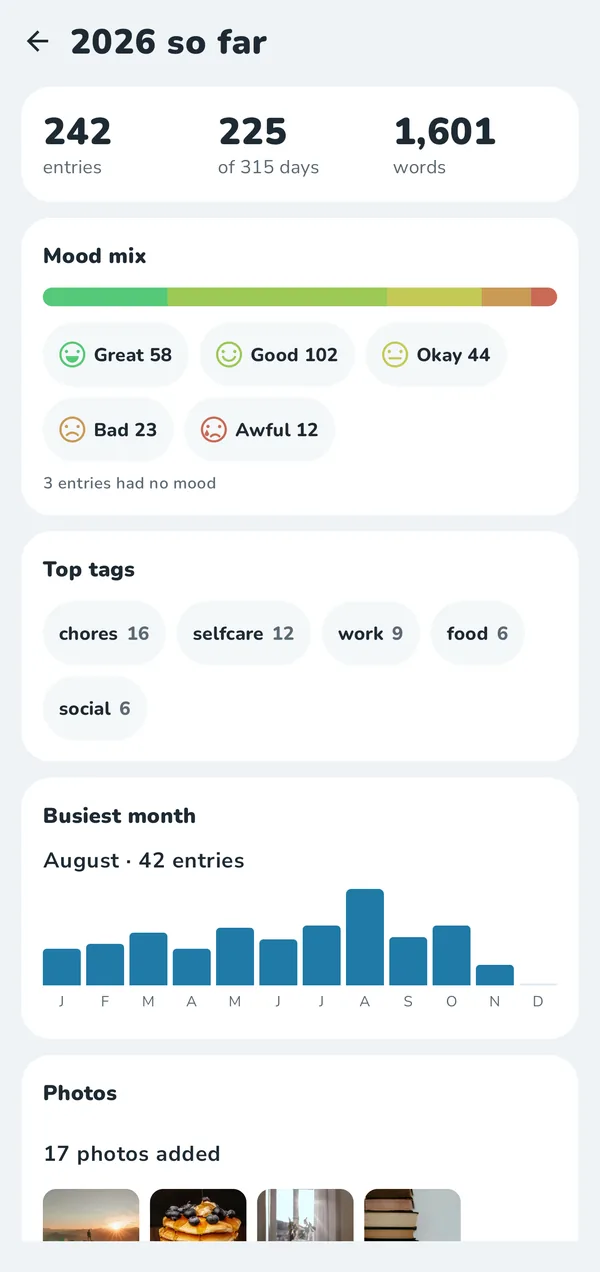
The 2026 so far review: 242 entries on 225 days, a mood mix, top tags, busiest month and photos

Look back

Your month and year, gathered up.

At the end of each month and year, see your entries, the days you wrote, your words, your mood mix and the moments you bookmarked.

  • Your top tags, busiest month and the photos you added
  • Rather not see something again? Hide it from look backs
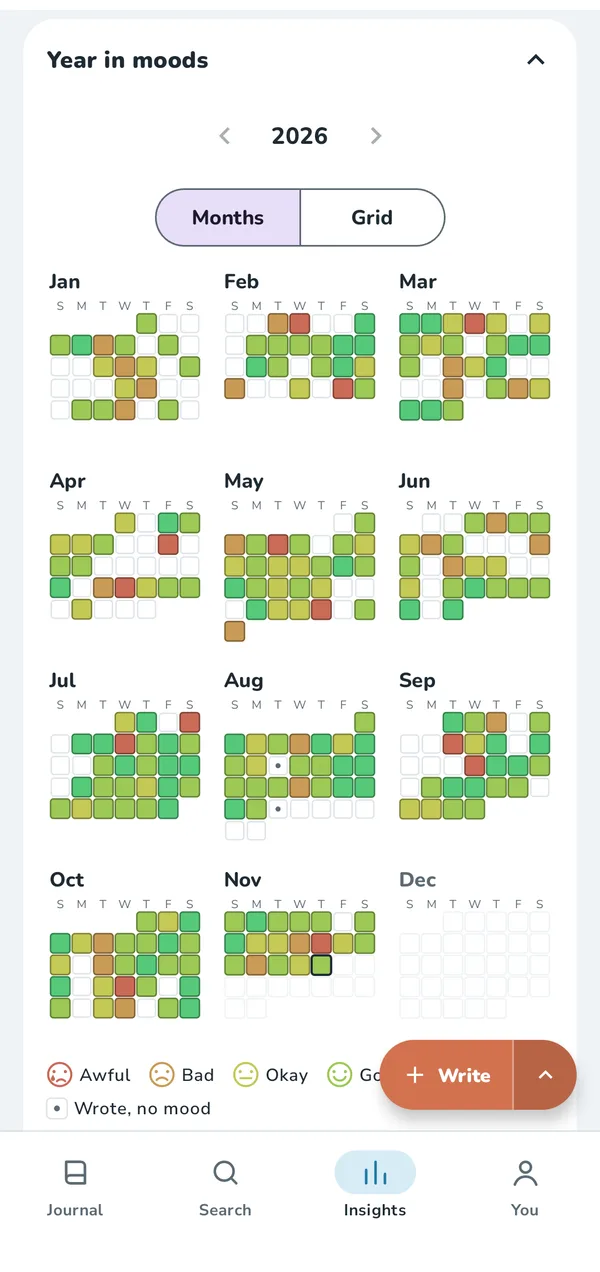
Year in moods for 2026: twelve little month calendars, each day coloured by its mood

Year in moods

A whole year, one square a day.

Each day takes the colour of the mood you gave it, so the good stretches and the hard weeks show at a glance.

  • See each month as a little calendar, or the whole year as one grid
  • Today is outlined; days without a mood stay grey
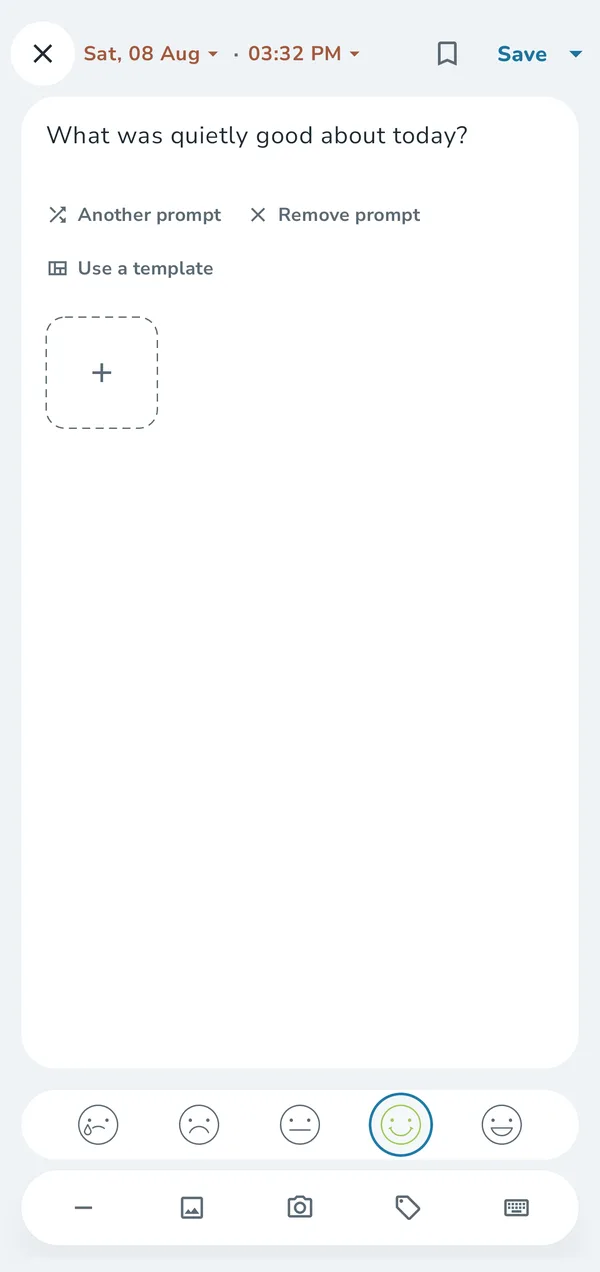
A new entry that starts with the prompt: What was quietly good about today?

Prompts

Stuck? Ask for a prompt.

A gentle question to get you going, like “What was quietly good about today?” Swap it or remove it.

  • One tap for another prompt
  • Turn any entry into a reusable template

Privacy

Locked, and backed up your way.

Your journal is yours. Here's what that means in practice.

Read the Privacy Policy
  • Lives on your phone

    No account needed to write. Your journal works offline and stays on your phone unless you turn on cloud backups, which need a free account and a connection.

  • Encrypted before upload

    Backups and photos are encrypted on your phone, then stored only in encrypted form. Add a backup password for even stronger encryption.

  • Locked with your fingerprint, face or PIN

    App lock uses your phone's own fingerprint, face or PIN check. We never receive it.

  • Easy to take with you

    Export to RTF or a portable ZIP any time (PDF with Premium), or import from Day One, Obsidian and Markdown.

Free and Premium

Journaling is free, with no limits on entries.

Premium adds automatic backups and more space for photos. Billed monthly or yearly through Google Play; the price for your country is shown in the app.

Free

$0 forever

  • Unlimited entries and photos on your phone
  • Templates, prompts, reminders and app lock
  • Manual encrypted backups; the newest 5 are kept
  • 30 MB of photo backup space
  • Export to RTF and ZIP · Insights for the last 30 days
  • Last month's review and this year's moods

For daily writers

Premium

Monthly or yearly via Google Play

  • Everything in Free
  • A daily automatic backup
  • 50 GB of photo backup space
  • More backups kept: 25 manual and 15 automatic
  • PDF export · Insights for any date range
  • Reviews and moods for every month and year

Cloud backups need a free account, and Premium follows it to any phone you sign in on. New subscribers may get a free trial; the app shows when billing starts. Cancel any time in Google Play. More about Premium

Questions

Good to know.

Is Tamsi the same app as Last Journal?

Yes. Tamsi is Last Journal's new name. Your entries, backups and Premium carry over as they are; there's nothing to do.

Do I need an account?

No. Tamsi works fully without one. An account is only for encrypted cloud backups, and you can add it any time.

Are my backups private?

Backups are encrypted on your phone before upload and stored only in encrypted form. Your journal stays private to you. For even stronger encryption, add a backup password. How encryption works

How do I move to a new phone?

Back up on the old phone, sign in the same way on the new one, and restore. Step by step

All help topics →

Start today's page.

Free on Google Play. Your first entry takes seconds.

Get it on Google Play